This notebook contains all the code examples from Section 2.4 Continuous random variables of the No Bullshit Guide to Statistics.
Notebook setup
We’ll start by importing the Python modules we’ll need for this notebook.
# Ensure required Python modules are installed
%pip install --quiet numpy scipy seaborn ministats
[notice] A new release of pip is available: 26.0.1 -> 26.1.2
[notice] To update, run: pip install --upgrade pip
Note: you may need to restart the kernel to use updated packages.
# Load Python modules
import numpy as np
import seaborn as sns
import matplotlib.pyplot as plt
# Figures setup
sns.set_theme(
context="paper",
style="whitegrid",
palette="colorblind",
rc={"font.family": "serif",
"font.serif": ["Palatino", "DejaVu Serif", "serif"],
"figure.figsize": (7.5, 2.3)},
)
%config InlineBackend.figure_format = 'retina'# Simple float __repr__
import numpy as np
if int(np.__version__.split(".")[0]) >= 2:
np.set_printoptions(legacy='1.25')Definitions
Random variables
random variable : a quantity that can take on different values.
sample space : describes the set of all possible outcomes of the random variable .
outcome: a particular value that can occur as a result of observing the random variable .
event subset of the sample space that can occur as a result of observing the random variable .
: the probability density function (PDF) is a function that assigns probabilities to the different outcome in the sample space of a random variable. The probability distribution function of the random variable is a function of the form .
Calculus prerequisites
Functions
In Python, we define functions using the def keyword.
For example, the code cell below defines the function ,
then evaluate it on the input .
# define the function g that takes input x
def g(x):
    return 0.5 * x

# calling the function g on input x=5
g(5)2.5xs = np.linspace(0, 10, 1000)
gs = g(xs)
ax = sns.lineplot(x=xs, y=gs)
ax.set_xlabel("$x$")
ax.set_ylabel("$g$");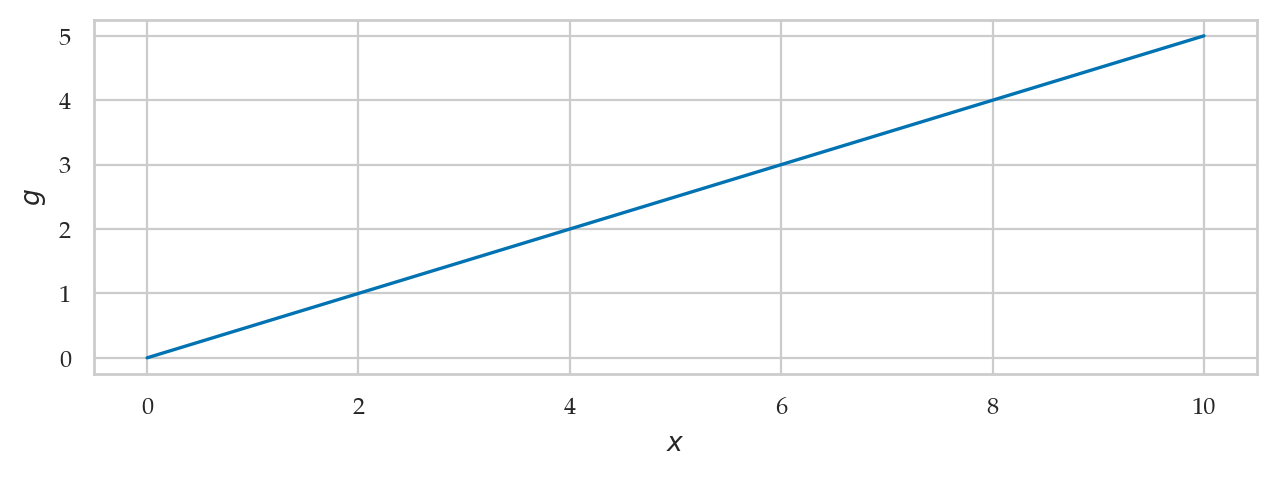
Integrals
The area under the graph of the function , between and is calculated using the following integral:
from ministats.calculus import plot_integral

# limits of integration
a = 2
b = 6

# highlight the area under g(x) between x=a and x=b
plot_integral(g, a=a, b=b, xlim=[0,10], flabel="g", autolabel=True);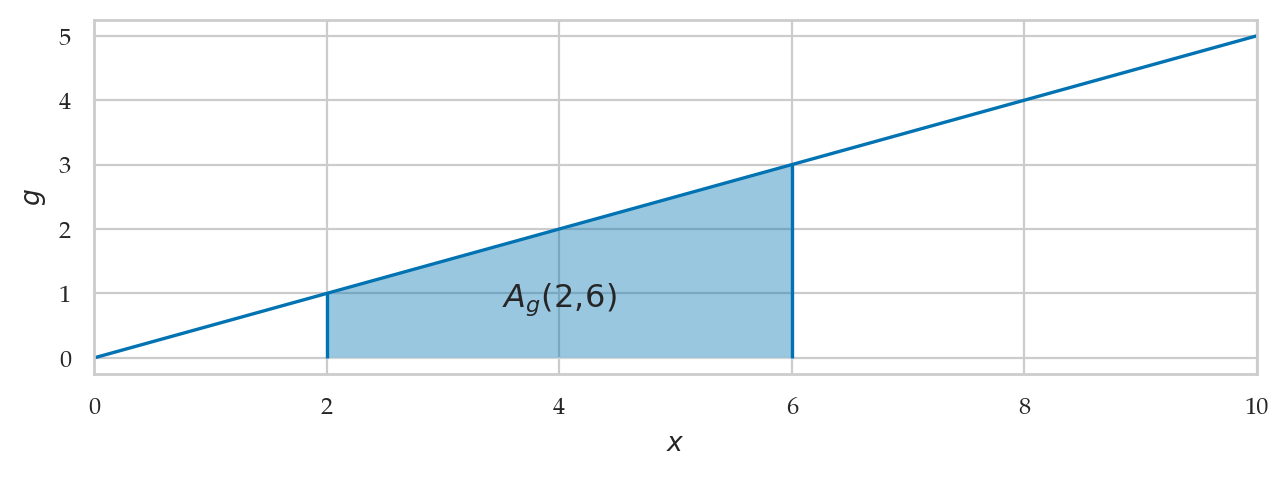
The function quad from the scipy.integrate module
allows us to compute the integral of any function.
from scipy.integrate import quad
quad(g, a=2, b=6)
(8.0, 8.881784197001252e-14)The function quad returns two numbers as output:
.
The first number is the value of the area we’re interested in.
The second number,
,
indicates the accuracy of the procedure used to calculate the area,
which is in this case.
We’re usually only interested in the value of the area,
so we select the first element of the output,
as shown below.
quad(g, a=2, b=6)[0]8.0We used [0] to select the first value of the output,
which is the value of the area .
Integral functions
The integral function corresponds to the area calculation with a variable upper limit of integration . It is defined as:
The integral function of the function is .
b = 6.5
ax = plot_integral(g, a=0, b=b, xlim=[0,10], flabel="g")
ax.text(3*b/4, g(b)/3, "$G_0(b)$", fontsize="x-large")
ax.text(b, -0.4, "$b$", ha="center", va="top");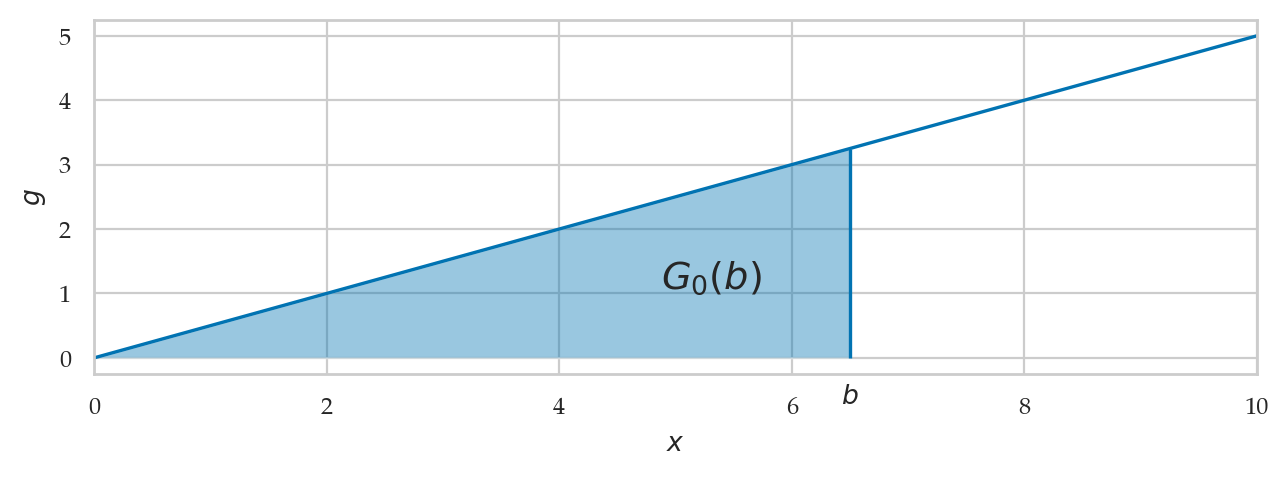
from ministats.book.figures import integral_as_difference_in_G

integral_as_difference_in_G();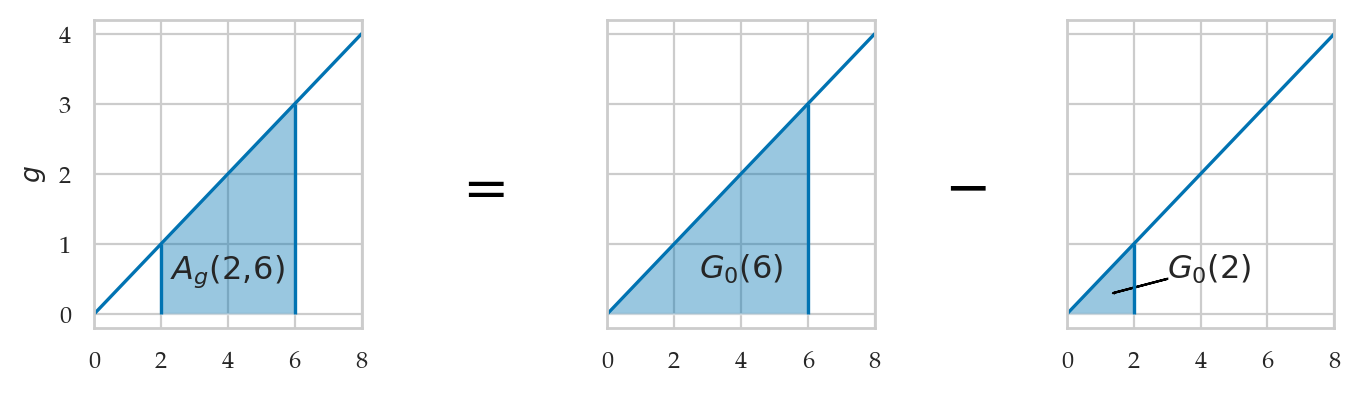
Computer models for random variables
Consider the computer model rvX for the random variable .
We saw previously in Section 2.1
TODO: compare and sync with text with Section 2.1
<model>: the family of probability distributions<params>: parameters of the model—specific value of the control knobs we choose in the general family of distributions to create a particular distribution<model>(<params>): a particular instance of probability model created by choosing a model family<model>and the model parameters<params>.example 1: uniform family of distribution with parameters and .
example 2: normal family of distribution with parameters and .
: math shorthand symbol that stands for “is distributed according to.” For example means the random variable is distributed according to model instance and parameters .
Summary of methods
TODO: import table of methods
Examples
The continuous uniform family of distribution , which assigns equal probabilities to all outcomes in the interval . To create a computer model for a continuous uniform distribution , use the code
uniform(loc=alpha,scale=beta-alpha).Normal distribution ...
Example 1: uniform distribution
The uniform distribution is described by the following probability density function:
For a uniform distribution , each between 0 and 1 is equally likely to occur, and values of outside this range have zero probability of occurring.
# define the computer model `rvU` for the random variable U
from scipy.stats import uniform
alpha = 0
beta = 1
rvU = uniform(loc=alpha, scale=beta-alpha)
Plotting the uniform probability density function
us = np.linspace(-0.1, 1.1, 1000)
fUs = rvU.pdf(us)
ax = sns.lineplot(x=us, y=fUs)
ax.set_xlabel("$u$")
ax.set_ylabel("$f_U$");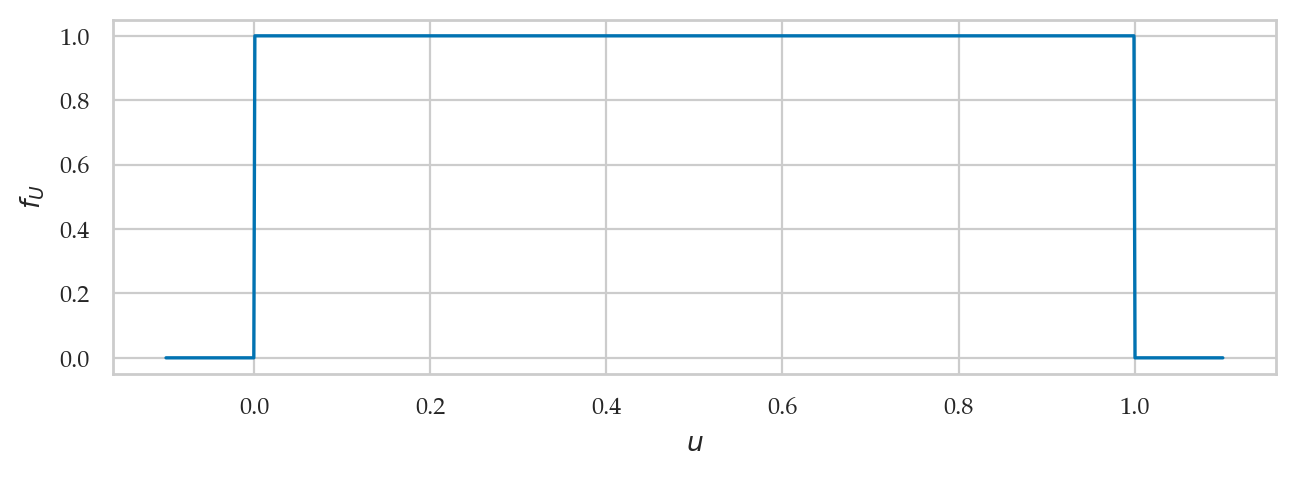
Alternatively,
we can use the helper function plot_pdf from the ministats library
to plot the PDF .
%pip install -q ministats
[notice] A new release of pip is available: 26.0.1 -> 26.1.2
[notice] To update, run: pip install --upgrade pip
Note: you may need to restart the kernel to use updated packages.
from ministats import plot_pdf
plot_pdf(rvU, xlims=[-0.1, 1.1], rv_name="U");
We can pass the options a and b to the function plot_pdf
to highlight the area that corresponds to
the probability of the event .
plot_pdf(rvU, xlims=[-0.1, 1.1], rv_name="U", a=0.2, b=0.5);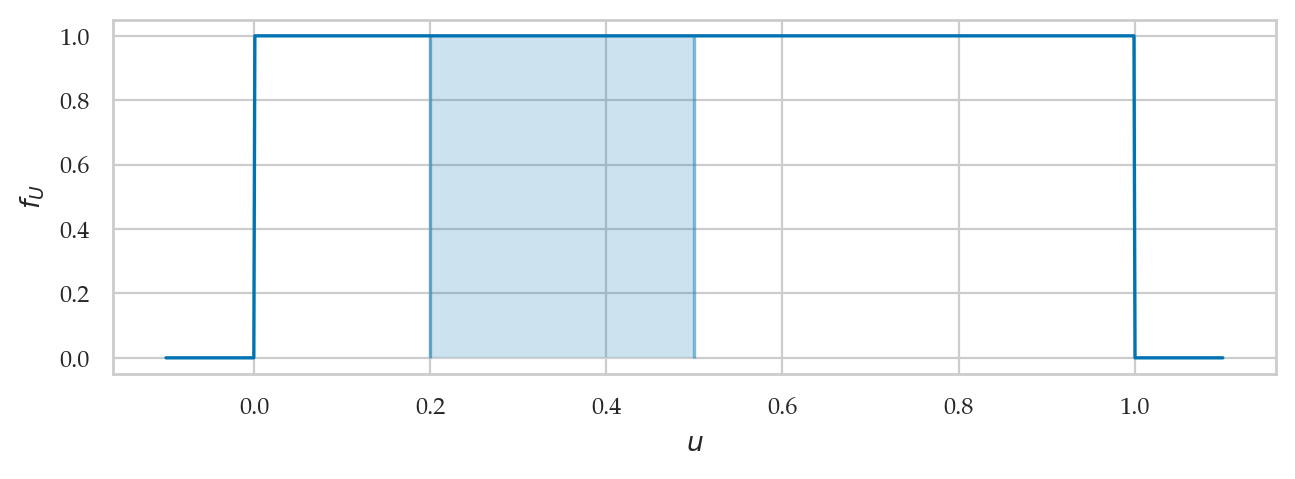
Calculating the probability of an event
TODO: math
# use `quad` function to integrate rvU.pdf between 0.2 and 0.5
from scipy.integrate import quad
quad(rvU.pdf, a=0.2, b=0.5)[0]0.3The total area under the graph of is equal to 1.
quad(rvU.pdf, a=0, b=1)[0]1.0Example 2: standard normal distribution
A standard normal random variable is described by the probability density function:
The mean (the Greek letter mu) and the standard deviation (the Greek letter sigma) are called the parameters of the distribution.
The math notation is used to describe the whole family of normal probability distributions, and is a particular instance of the distribution with mean and standard deviation .
# define the computer model `rvZ` for the random variable Z
from scipy.stats import norm
muZ = 0
sigmaZ = 1
rvZ = norm(muZ, sigmaZ)
Plotting the normal probability density function
from ministats import plot_pdf

plot_pdf(rvZ, xlims=[-4,4], rv_name="Z", a=1, b=2);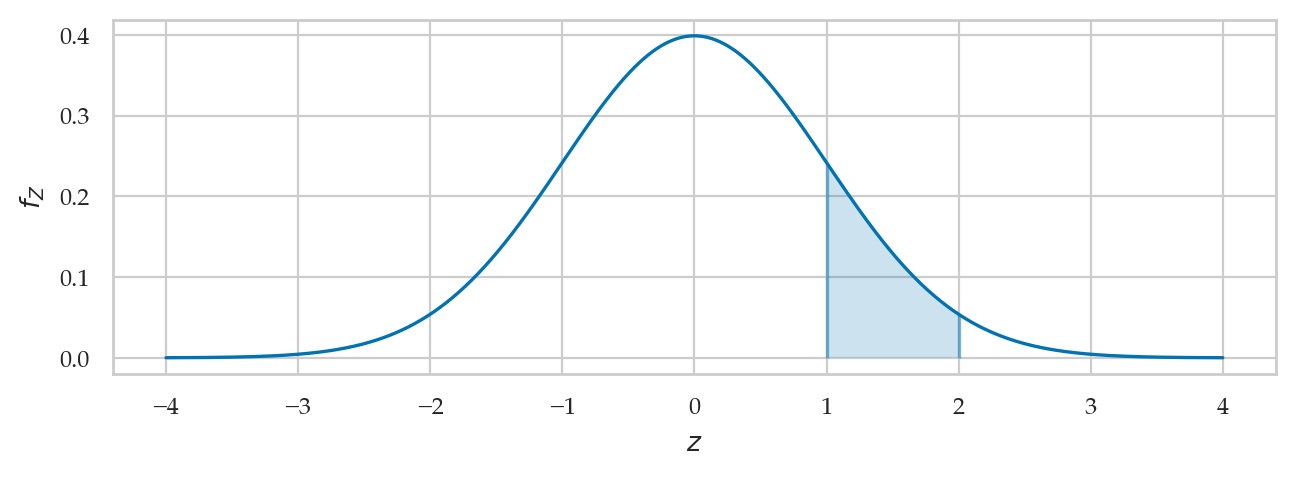
Calculating the probability of an event
The code example below shows the calculation of the probability , which corresponds to the integral .
We use the quad function to integrate rvZ.pdf between and .
from scipy.integrate import quad
quad(rvZ.pdf, a=1, b=2)[0]0.13590512198327787The total area under the graph of is equal to 1.
To verify this claim, we would need to compute , but the values of drop off to zero very quickly outside the central region, so it is sufficient to compute the integral , which extends 10 standard deviations to the left and 10 standard deviaitons to the right.
quad(rvZ.pdf, a=-10, b=10)[0]1.0000000000000002Cumulative distribution functions
Definitions:
: the cumulative distribution function (CDF) tells us the probability of an outcome less than or equal to a given value: .
: the inverse cumulative distribution function computes contains the information about the quantiles of the probability distribution. The value tells how far you need to go in the sample space so that the event contains a proportion of the total probability: .
Example 1 (continued): uniform random variable
bs = np.linspace(-0.2, 1.2, 1000)
FUs = rvU.cdf(bs)
ax = sns.lineplot(x=bs, y=FUs)
ax.set_xlabel("$b$")
ax.set_ylabel("$F_U$");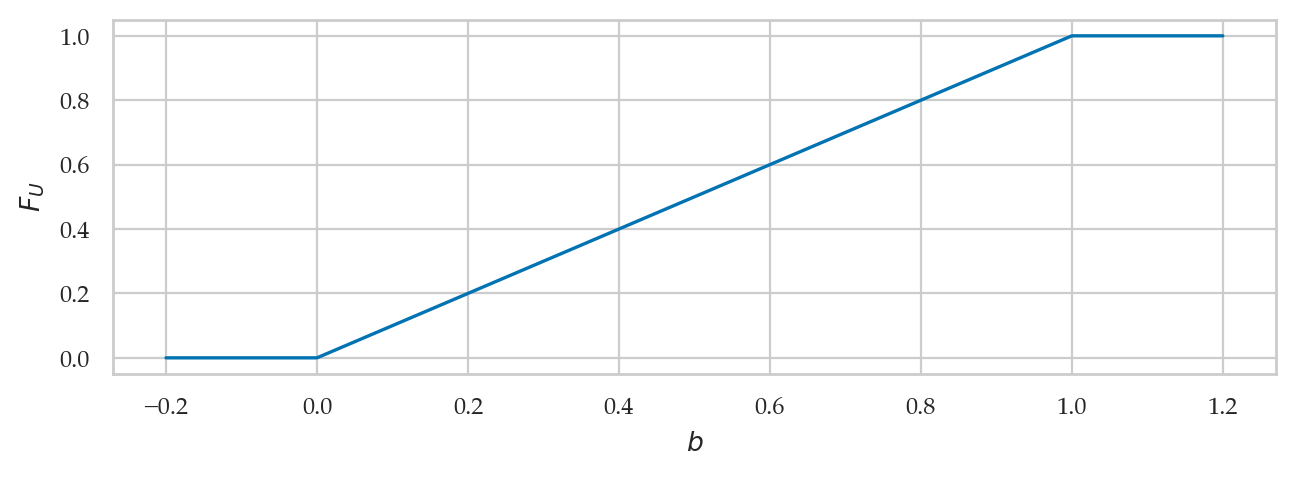
from ministats import plot_cdf
plot_cdf(rvU, xlims=[-0.2,1.2], rv_name="U");
from ministats import plot_pdf_and_cdf
plot_pdf_and_cdf(rvU, b=0.7, xlims=[-0.2,1.2], rv_name="U");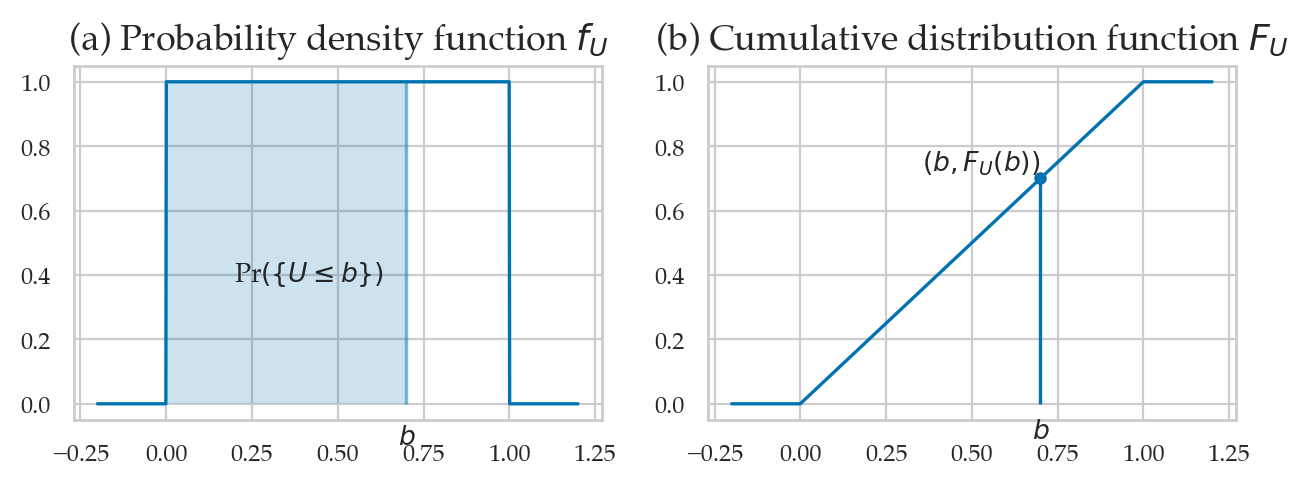
rvU.cdf(0.5) - rvU.cdf(0.2)0.3quad(rvU.pdf, a=0.2, b=0.5)[0]0.3Example 2 (continued): normal random variable
plot_pdf_and_cdf(rvZ, b=1.4, rv_name="Z");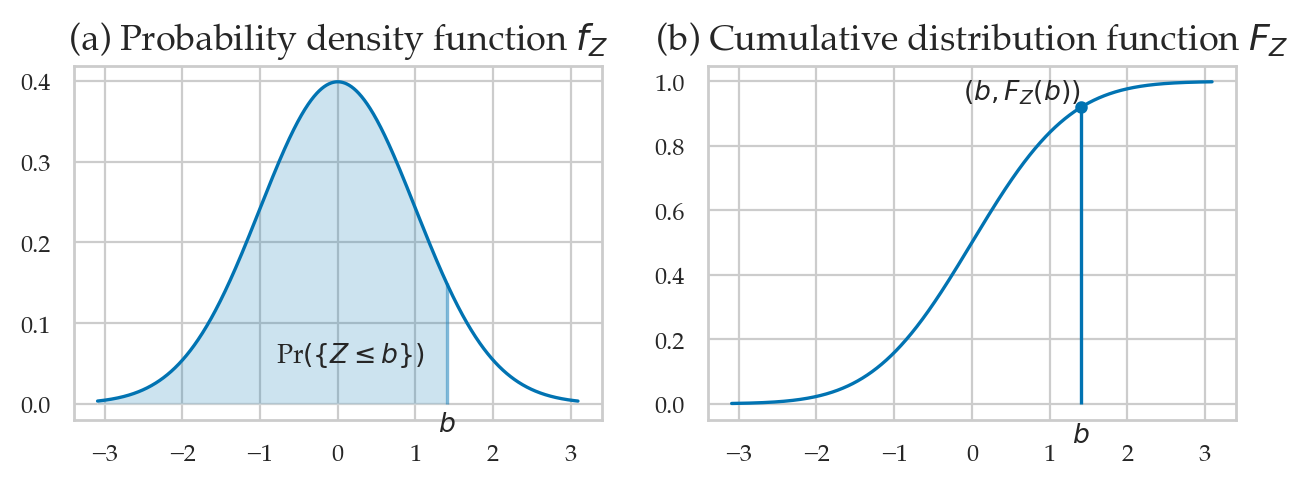
rvZ.cdf(2) - rvZ.cdf(1)0.13590512198327787quad(rvZ.pdf, a=1, b=2)[0]0.13590512198327787Inverse of the cumulative distribution function
rvZ.ppf(0.95)1.644853626951472rvZ.cdf(1.6448536269514722)0.95[rvZ.ppf(0.05), rvZ.ppf(0.95)][-1.6448536269514729, 1.644853626951472]Calculating expectations
We denote the expected value of the function computes the average value of computed for all the possible values of the random variable .
Example 1: mean and variance of the uniform distribution
rvU.mean()0.5# # ALT. manual integration
# quad(lambda u: u*rvU.pdf(u), a=0, b=1)[0]So the mean is .
rvU.var()0.08333333333333333# # ALT. manual integration
# quad(lambda u: (u-0.5)**2*rvU.pdf(u), a=0, b=1)[0]So the variance of is .
We can compute the standard deviation (the square root of the variance)
by calling the method rvu.std.
rvU.std()0.28867513459481287Example 2: mean and variance of a normal distribution
The mean of is
rvZ.mean()0.0The variance of is
rvZ.var()1.0rvZ.std()1.0# ALT. manual integration
# quad(lambda z: (z-0)**2*rvZ.pdf(z), a=-10, b=10)[0]Skewness and kurtosis
rvZ.stats(moments="s")0.0rvZ.stats(moments="k")0.0Kombucha volume example
A random variable with a normal distribution is described by the probability density function:
The mean (the Greek letter mu) and the standard deviation (the Greek letter sigma) are called the parameters of the distribution.
The math notation is used to describe the whole family of normal probability distributions, and is a particular instance of the distribution with mean and standard deviation .
Create a normal random variable with mean 1000 and standard deviation 10.
from scipy.stats import norm

muK = 1000
sigmaK = 10
rvK = norm(muK, sigmaK)
# type(rvK)# MAYBE: rvK.pdf = def fK(k) ... show Python function Plotting the probability density function
from ministats import plot_pdf

plot_pdf(rvK, xlims=[960,1040], rv_name="K");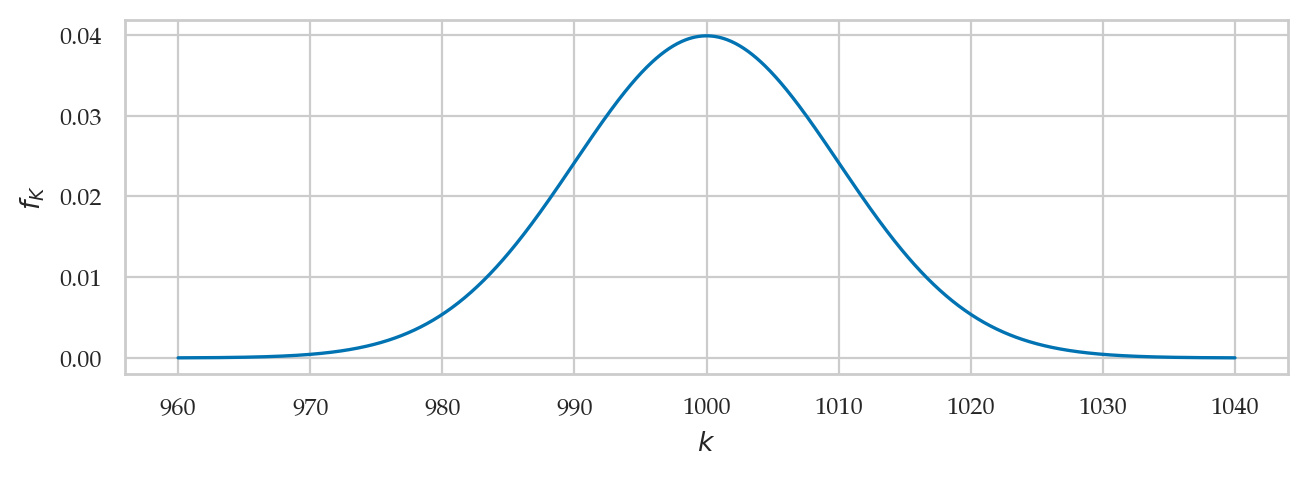
The cumulative distribution is the integral of the probability density function:
from ministats import plot_cdf

plot_cdf(rvK, xlims=[960,1040], rv_name="K");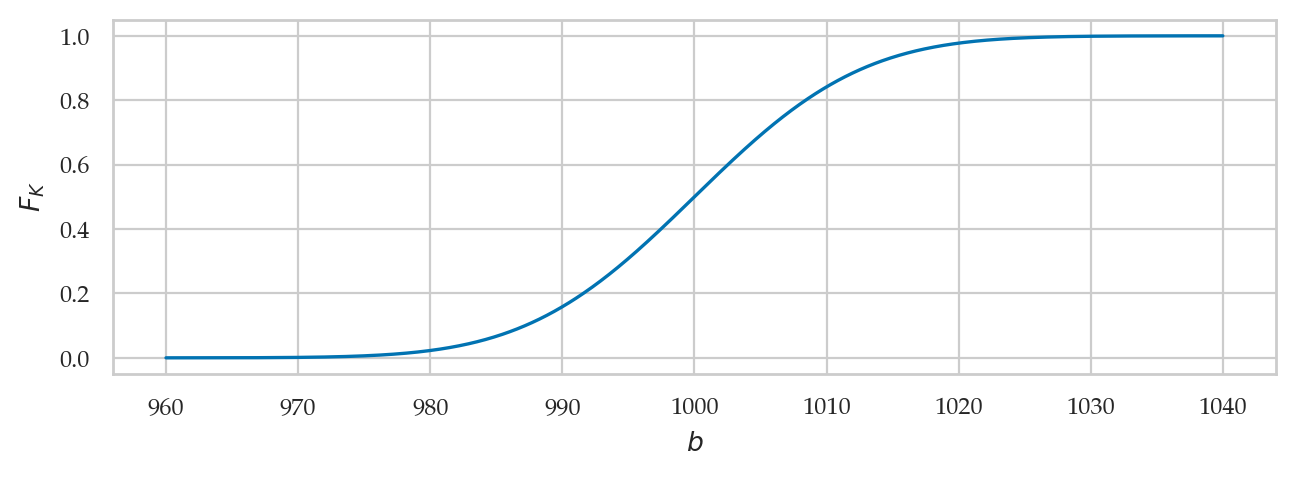
The inverse of the cumulative distribution function
is available as method rvK.ppf.
qs = np.linspace(0, 1, 10000)
invFqs = rvK.ppf(qs)
ax = sns.lineplot(x=qs, y=invFqs)
ax.set_xlabel("$q$")
ax.set_ylabel("$F_K^{-1}$");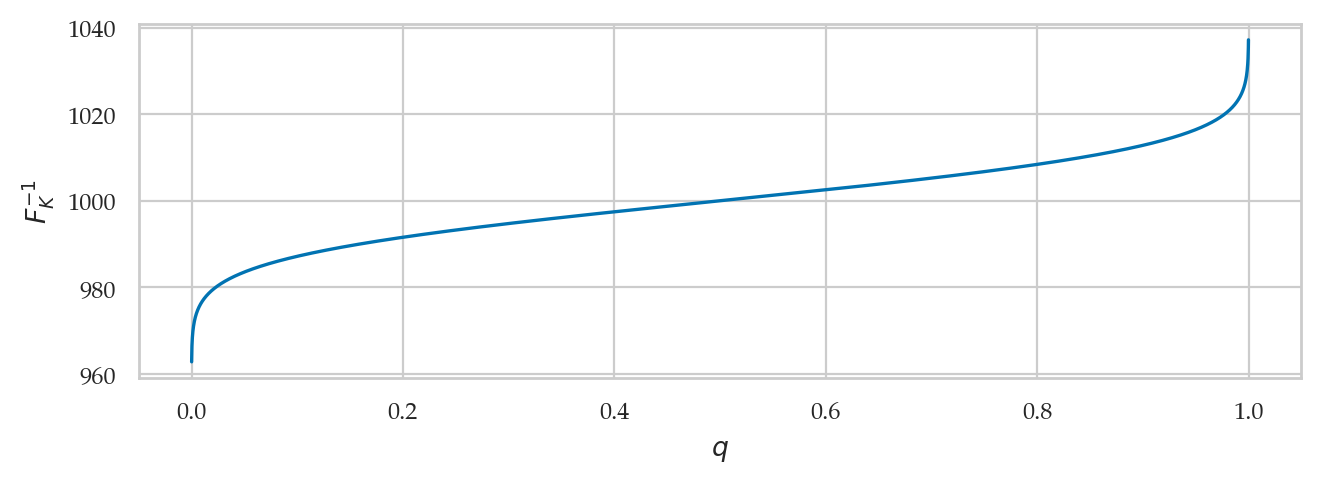
Properties of the distribution
rvK.mean()1000.0rvK.var()100.0rvK.std()10.0rvK.median()1000.0rvK.support()(-inf, inf)Computing probabilities
Suppose you want to compute the probability of the outcome for the random variable .
Option A: Obtain by calculating the integral of between 980 and 1020.
quad(rvK.pdf, 980, 1020)[0]0.9544997361036411Option B: Obtain by calculating the difference in the CDF , .
rvK.cdf(1020) - rvK.cdf(980)0.9544997361036416Computing quantiles
Suppose we want to find the interval that contains proportion of the total probability. We can fing by calling the inverse CDF funciton .
First quartile
The first quartile ( quantile) is located at :
rvK.ppf(0.25)993.2551024980392We can verify that by calling rvK.cdf with that value.
rvK.cdf(993.2551024980392)0.24999999999999895Second quartile = the median
rvK.ppf(0.5)1000.0Third quartile
rvK.ppf(0.75)1006.7448975019608Left tail
rvK.ppf(0.05)983.5514637304852Right tail
rvK.ppf(0.95)1016.4485362695148Computing confidence intervals
To compute a 90% confidence interval for the random variable ,
we can call the rvK.ppf() twice.
[rvK.ppf(0.05), rvK.ppf(0.95)][983.5514637304852, 1016.4485362695148]Generating random observations
Let’s say you want to generate observations from the random variable .
You can do this by calling the method rvK.rvs(100).
np.random.seed(46)

ksample = rvK.rvs(100)
ksample[0:3]
array([1005.8487584 , 1012.3119574 , 1008.21900264])Sample mean
np.mean(ksample)999.3321800993151Sample standard deviation
np.std(ksample, ddof=1)9.234629119029867Computing expectations
Suppose the distributor accepts only bottles contain between 980 ml and 1020 ml, and you’ll receive a receive payment of for each bottle. Bottles outside that range get rejected and you don’t get paid for them.
def payment(k):
    if 980 <= k and k <= 1020:
        return 2
    else:
        return 0
# get paid if in spec
payment(1005)2# don't get paid if out of spec
payment(1025)0# expected value of payment
rvK.expect(payment, lb=-np.inf, ub=np.inf)1.9089994604952036Visually speaking, only the middle part of the probability distribution “counts” towards the payment. The subset that contributes to the expectation can be visualized as the values inside the rectangular region shown below.
ks = np.linspace(950, 1050, 1000)
payments = [payment(k)/50 for k in ks]

sns.lineplot(x=ks, y=rvK.pdf(ks), label="PDF $f_K$")
sns.lineplot(x=ks, y=payments, label="payment(k)");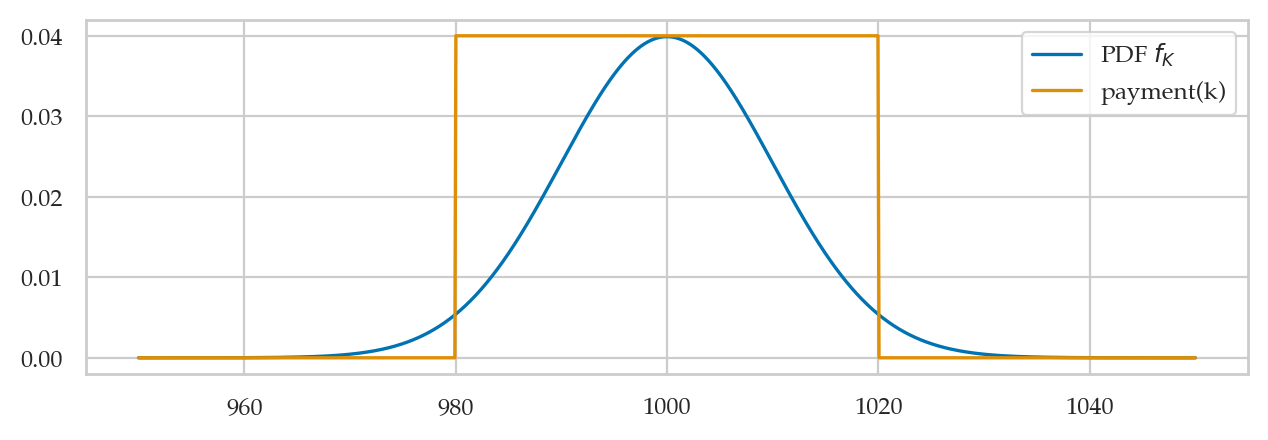
Discussion
Bulk of the normal distribution
How much of the total probability lies within standard deviations of the mean?
from scipy.stats import norm
rvK = norm(1000, 10)
from scipy.integrate import quad
muK = rvK.mean() # mean of the random variable rvK
sigmaK = rvK.std() # standard deviation of rvK
for n in [2, 3]:
I_n = [muK - n*sigmaK, muK + n*sigmaK]
p_n = quad(rvK.pdf, I_n[0], I_n[1])[0]
print(f"p_{n} = Pr( K in {I_n} ) = {p_n:.3f}")p_2 = Pr( K in [980.0, 1020.0] ) = 0.954
p_3 = Pr( K in [970.0, 1030.0] ) = 0.997
The code below highlights the interval and computes the probability .
Change the value of the variable n to get different plots.
from ministats.book.figures import bulk_of_pdf_panel

bulk_of_pdf_panel(rvK, rv_name="K", xlims=[960, 1040]);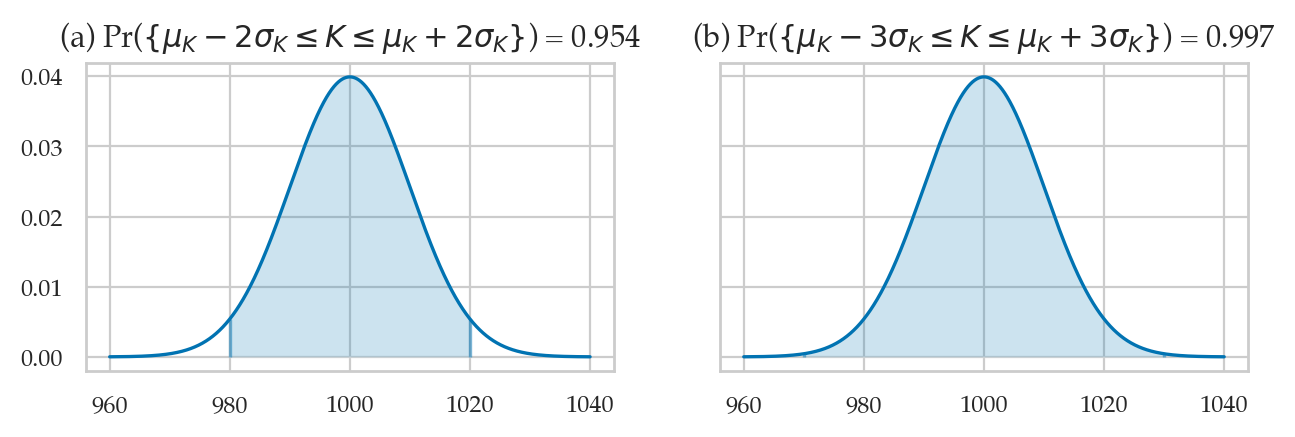
from ministats import calc_prob_and_plot

n = 2  # number of standard deviations around the mean

# values of x in the interval 𝜇 ± n𝜎 = [𝜇-n𝜎, 𝜇+n𝜎]
I_n = [muK - n*sigmaK, muK + n*sigmaK]
p_n, _ = calc_prob_and_plot(rvK, I_n[0], I_n[1])
p_n
0.9544997361036411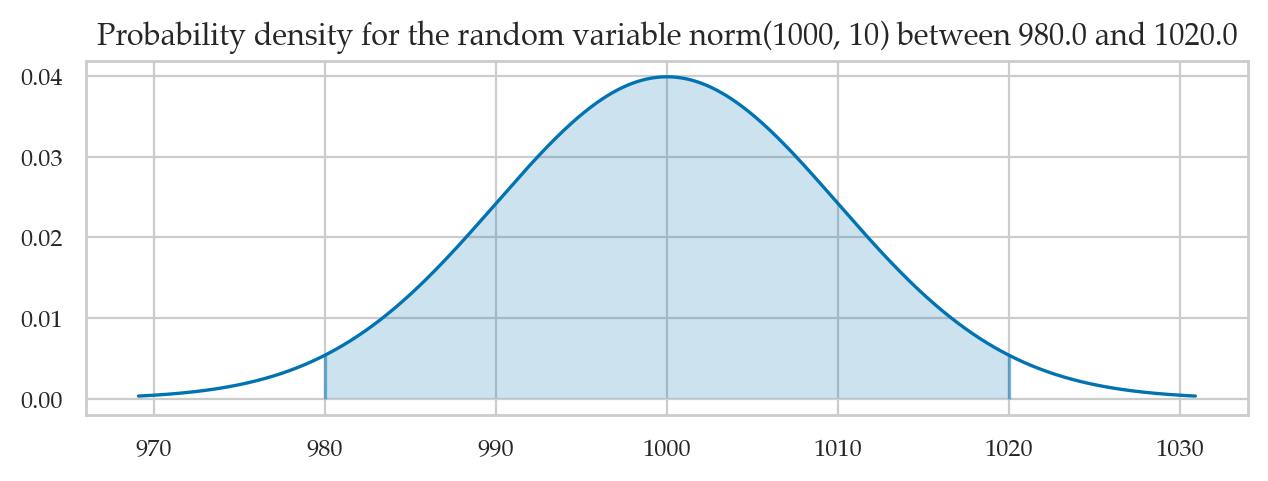
Try changing the value of the variable n to 1 or 3 in the above code cell.
Tails of the normal distribution
We’re often interested in tail ends of the distribution, which contain the unlikely events.
muK = rvK.mean()    # mean of the random variable rvK
sigmaK = rvK.std()  # standard deviation of rvK

for n in [2, 3]:
    # compute the probability in the left tail (-∞,𝜇-n𝜎]
    x_l = muK - n*sigmaK
    p_l = quad(rvK.pdf, -np.inf, x_l)[0]
    # compute the probability in the right tail [𝜇+n𝜎,∞)
    x_r = muK + n*sigmaK
    p_r = quad(rvK.pdf, x_r, np.inf)[0]
    # add together to get total probability in the tails
    p_tails = p_l + p_r
    print(f"Pr({{K<{x_l} or K>{x_r}}}) = {p_tails:.4f}")
Pr({K<980.0 or K>1020.0}) = 0.0455
Pr({K<970.0 or K>1030.0}) = 0.0027
The code below highlights the tails of the distribution.
from ministats import calc_prob_and_plot_tails

muK = rvK.mean()    # mean of the random variable rvK
sigmaK = rvK.std()  # standard deviation of rvK

n = 2  # number of standard deviations around the mean

# the distribution's left tail (-∞,𝜇-k𝜎]
x_l = muK - n*sigmaK

# the distribution's right tail [𝜇+k𝜎,∞)
x_r = muK + n*sigmaK

p_tails, _ = calc_prob_and_plot_tails(rvK, x_l, x_r, xlims=[960, 1040])

print(f"Pr( {{K<{x_l}}} ∪ {{K>{x_r}}} ) = {p_tails:.4f}")
Pr( {K<980.0} ∪ {K>1020.0} ) = 0.0455
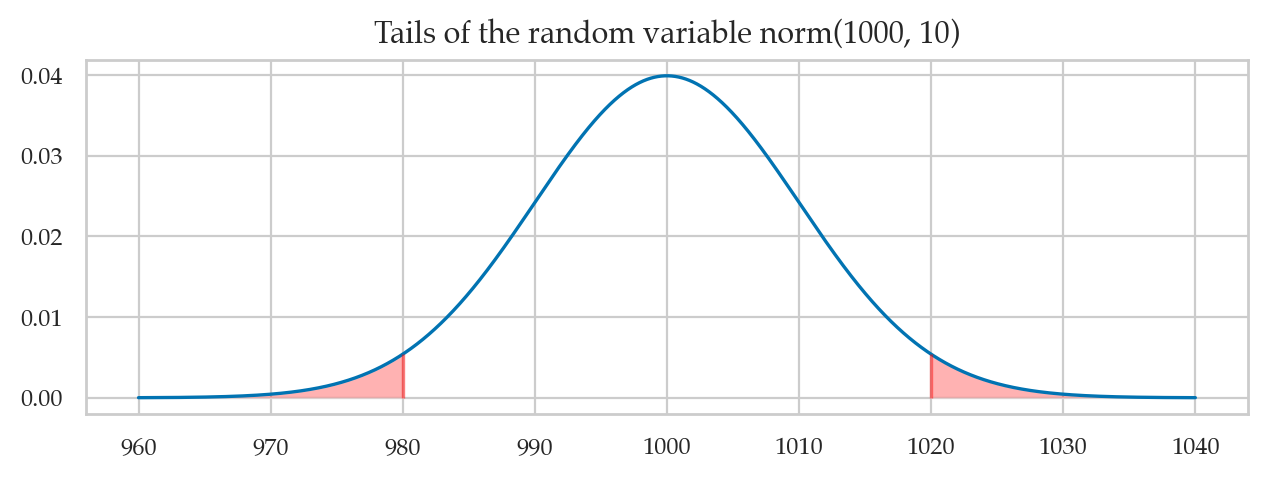
Try changing the value of the variable n in the above code cell.
from ministats.book.figures import tails_of_pdf_panel

tails_of_pdf_panel(rvK, rv_name="K", xlims=[960,1040]);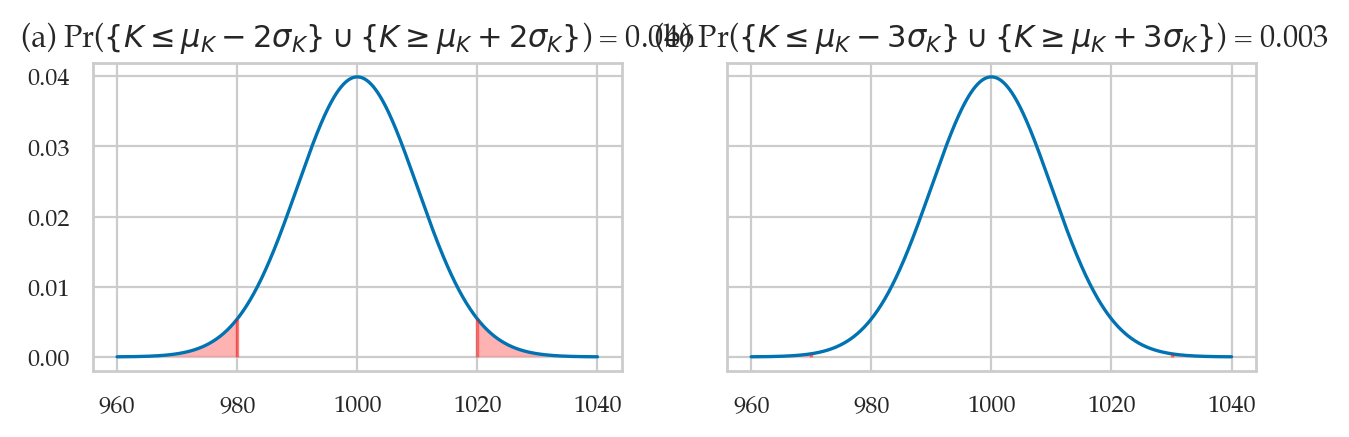
The above calculations leads us to an important rule of thumb: the values of the 5% tail of the distribution are approximately standard deviations away from the mean (more precisely to get exactly 5%). We’ll use this facts later in Chapter 3 to define events that are less than 5% likely to occur by chance.