This notebook contains the code examples from Section 2.7 Simulation and empirical distributions of the No Bullshit Guide to Statistics.
Notebook setup
# Ensure required Python modules are installed
%pip install --quiet numpy scipy seaborn ministats
Note: you may need to restart the kernel to use updated packages.
# Load Python modules
import numpy as np
import pandas as pd
import random
import seaborn as sns
import matplotlib.pyplot as plt
# Figures setup
plt.clf() # needed otherwise `sns.set_theme` doesn't work
sns.set_theme(
context="paper",
style="whitegrid",
palette="colorblind",
rc={"font.family": "serif",
"font.serif": ["Palatino", "DejaVu Serif", "serif"],
"figure.figsize": (7,2)},
)
%config InlineBackend.figure_format = "retina"<Figure size 640x480 with 0 Axes># Simple float __repr__
import numpy as np
if int(np.__version__.split(".")[0]) >= 2:
np.set_printoptions(legacy='1.25')Why simulate?
Running simulations of random variables is super useful:
Simplified probability calculations: no need for complicated integrals, since we can replace any calculation you might want to do with the distribution with an equivalent calculation on the list of observations
Visualize probability theory results: using simulations based on random observations , we can visualize these theoretical results to gain hands-on intuition and experience with them.
Verify that statistics procedures work: we can use simulation to experimentally verify the performance of the statistical procedure. Does a procedure really work correctly 95% of the time? Simulate 1000 datasets and count the proportion of times when the procedure worked correctly.
In the remainder of this section, we’ll learn how to use the list of observations as an alternative to the math calculations with the random variable , including visualizations and various probabilities.
Observations from random variables
Generating lists of random observations
from scipy.stats import expon

lam = 0.2
rvE = expon(loc=0, scale=1/lam)
np.random.seed(44)
N = 1000 # number of observations to generate
es = rvE.rvs(N)
es[0:7].round(3)array([9.004, 0.554, 6.825, 2.235, 2.226, 4.698, 2.503])Visualizing probability distribution
# Plot a histogram of the simulated data
ax = sns.histplot(es, bins=range(0,31), stat="density", label="es");

# Plot the PDF of rvE
from ministats import plot_pdf
plot_pdf(rvE, rv_name="E", color="C1", ax=ax, label="$f_E$");
ax.set_xlim([0,30]);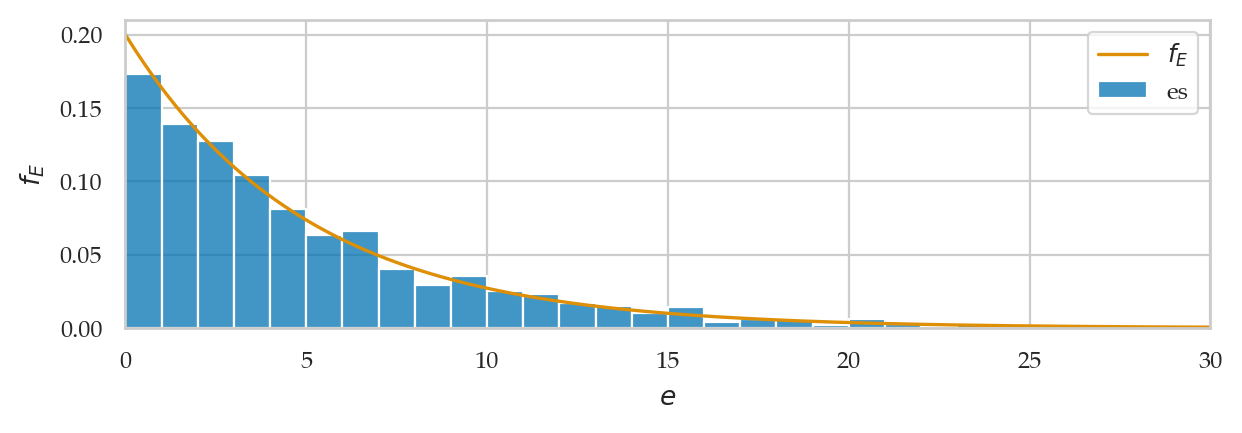
Calculate the mean and variance
import numpy as np
np.mean(es), rvE.mean()
(5.119377169180479, 5.0)np.var(es), rvE.var()(25.12355642871208, 25.0)np.std(es), rvE.std()(5.012340414288726, 5.0)Calculate probabilities
len([e for e in es if e >= 7]) / len(es)0.247from scipy.integrate import quad
quad(rvE.pdf, 7, np.inf)[0]0.24659696394160651 - rvE.cdf(7)0.24659696394160646Compute expectations
def fatigue(e):
    return 10 / (1 + e)

np.mean([fatigue(e) for e in es])2.894485288770725rvE.expect(fatigue)2.9866974938644915Empirical distributions
Empirical probability mass function
xs = [1, 1.5, 2, 3, 3, 3.5, 6, 7, 10, 17]from ministats import plot_epmf
plot_epmf(xs, name="xs");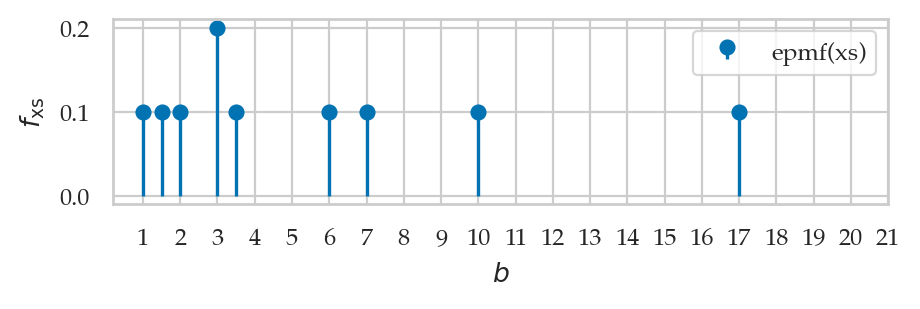
Generating bootstrap observations
Suppose we want to simulate new random observations form ,
but for some reason we don’t have access to the method rvE.rvs anymore.
np.random.seed(52)

xs_boot = np.random.choice(xs, 5, replace=True)
xs_boot
array([3.5, 7. , 6. , 7. , 1. ])[x_boot in xs for x_boot in xs_boot][True, True, True, True, True]list(xs_boot).count(7)2Empirical cumulative distribution function
Let’s write a function that compute the value empirical cumulative distribution (empirical CDF)
of the sample data. The function takes two inputs: data the sample of observations,
and b, the value where we want to evaluate the function.
def ecdf(data, b):
    sorted_data = np.sort(data)
    count = sum(sorted_data <= b)  # num. of obs. <= b
    return count / len(data)       # proportion of total
Note the sorting step is not strictly necessary,
but it guarantees the sdata is a NymPy array object which allows the comparison to work.
ecdf(xs, 5)0.6ecdf(xs, 10)0.9import seaborn as sns
sns.ecdfplot(x=xs);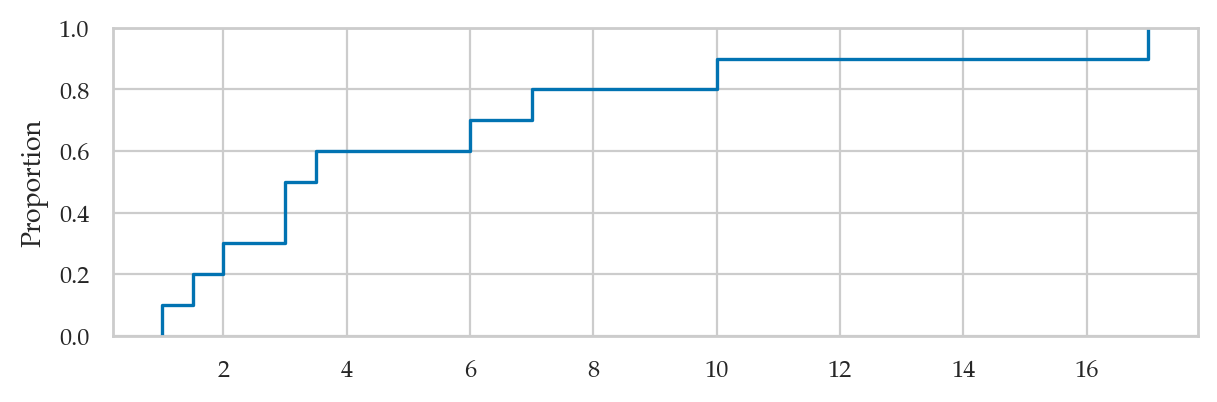
# ALT. use the `plot_ecdf` function from `ministats`
from ministats import plot_ecdf
ax = plot_ecdf(xs, name="xs")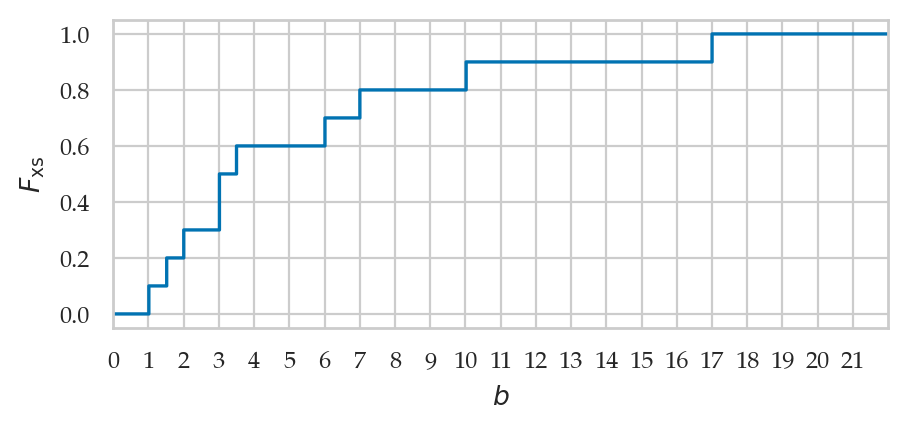
Inverse of the empirical cumulative distribution function
def inv_ecdf(data, q):
    return np.quantile(data, q, method="inverted_cdf")

# TEST inv_ecdf
# K = 1000
# qs = np.linspace(0, 1, K)
# qs2 = np.ndarray(K)
# for i, q in enumerate(qs):
#     x = inv_ecdf(es, q)
#     q2 = ecdf(es, x)
#     qs2[i] = q2
# sns.histplot(qs2 - qs)
TODO: explain inverse empirical CDF
sns.ecdfplot(y=xs);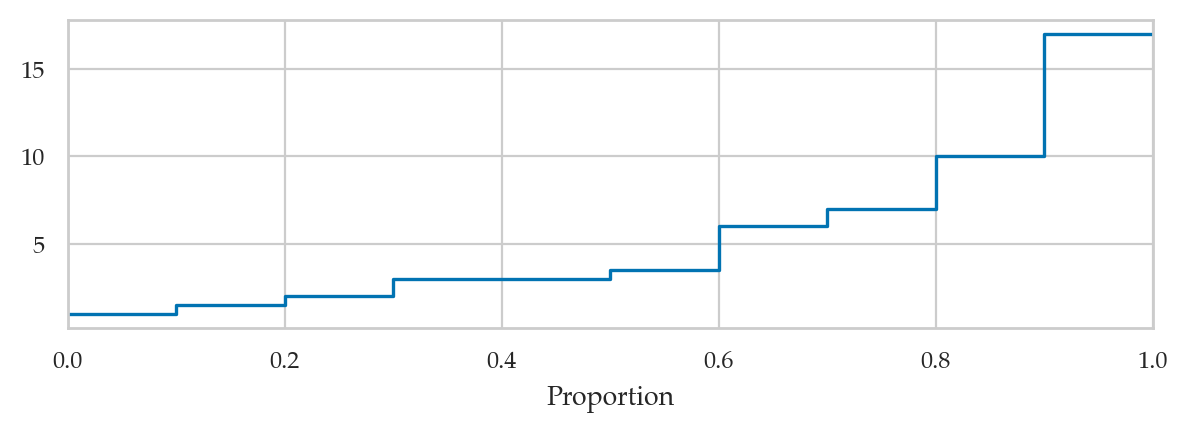
Random variable generation from scratch
Uniform random variable primitive
import numpy as np
np.random.seed(41)
np.random.rand()0.25092362374494015np.random.seed(42)
np.random.rand()0.3745401188473625np.random.seed(45)
us = np.random.rand(8000)
sns.histplot(us, bins=40, stat="density");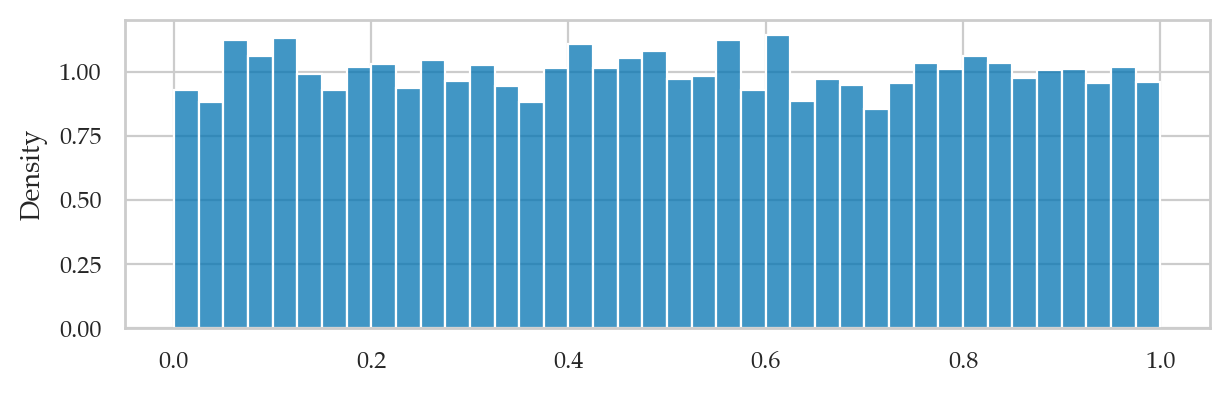
Continuous random variable generation
See the book or explanations of the the invers-CDF trick.
Generating exponentially distributed observations
def gen_e(lam):
    u = np.random.rand()
    e = -1 * np.log(1-u) / lam
    return e
Where lam is the (lambda) parameter chosen for exponential model family.
np.random.seed(26)

N = 200  # number of observations to generate
es2 = [gen_e(lam=0.2) for i in range(N)]
es2[0:5] # first five observations[1.8403766434262139,
3.663511132756237,
7.311508774831116,
7.784719180427214,
10.222768798178041]# [e.round(3) for e in es2[0:5]] # first five observations# Plot a histogram of data in `es2`
ax = sns.histplot(es2, bins=range(30), stat="density", label="hist(es2)")
# Plot the PDF of rvE
from ministats import plot_pdf
plot_pdf(rvE, rv_name="E", xlims=[0,30], color="C1", ax=ax, label="PDF $f_E$");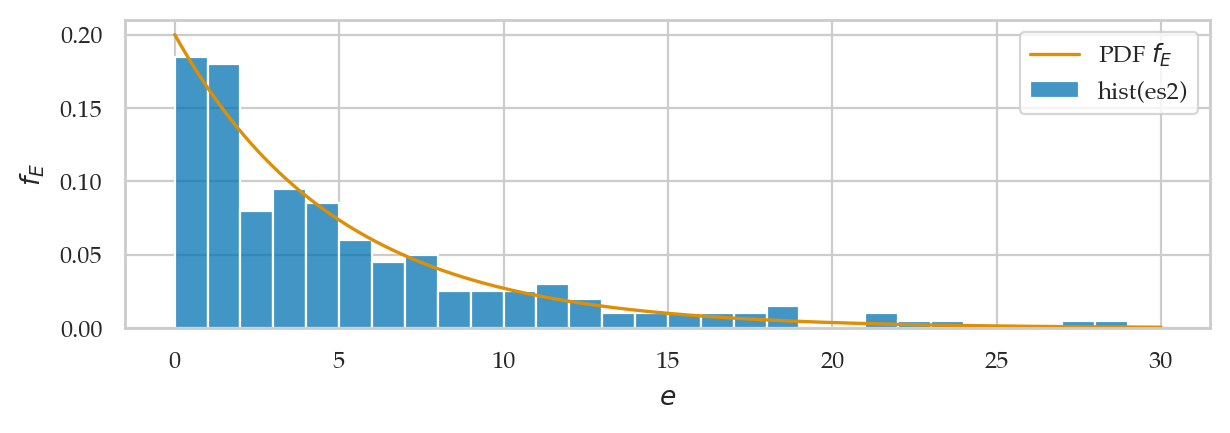
# Plot the empirical CDF of es2
ax = sns.ecdfplot(es2, label="eCDF(es2)")

# Plot the CDF of rvE on the same axis
from ministats import plot_cdf
plot_cdf(rvE, rv_name="E", xlims=[0,30], ax=ax, color="C1", label="CDF $F_E$")
ax.set_xlabel(None)
ax.set_xticks(range(0,31,5));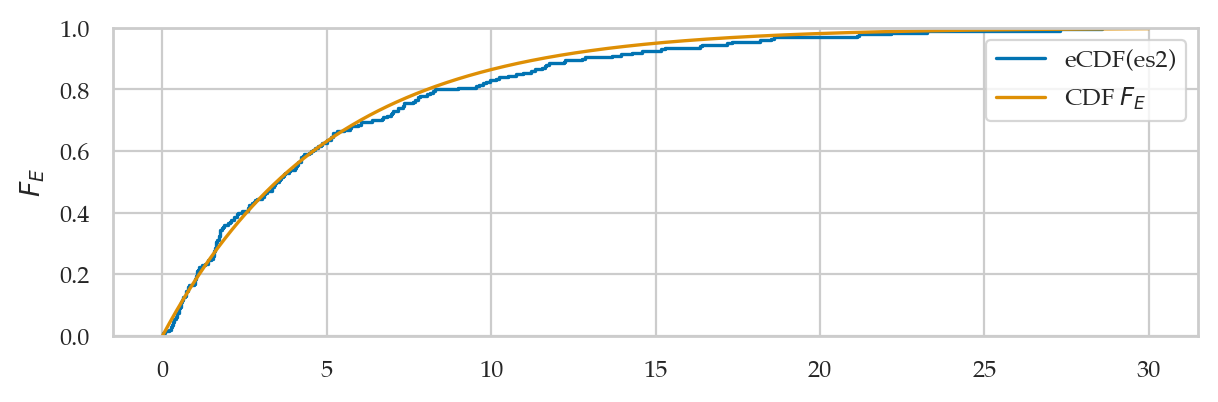
We’ll develop various way to analyze this “goodness of fit” between the sample es data we generated
and the theoretical model in the remainder of this notebook.
Measuring data-model fit
Want to measure if es comes from .
Here are the first five values we simulated:
es2[0:5][1.8403766434262139,
3.663511132756237,
7.311508774831116,
7.784719180427214,
10.222768798178041]Visual comparison between data and model distributions
from scipy.stats import expon
lam = 0.2
rvE = expon(0, 1/lam)
Here is the code for visual comparison of es2 and the theoretical model rvE , based on the probability density and cumulative probability distributions.
Using Q-Q plots to compare quantiles
The quantile-quantile plot qq_plot(data, dist)
is used to compare the positions of the quantiles of the dataset data
against the quantiles of the theoretical distribution dist,
which is an instance of one of the probability models in scipy.stats.
Exponential sample vs. true exponential model
from statsmodels.graphics.api import qqplot
fig = qqplot(np.array(es2), dist=rvE, line="q")
fig.axes[0].set_xlabel("Location of the rvE quantiles")
fig.axes[0].set_ylabel("Location of the es2 quantiles");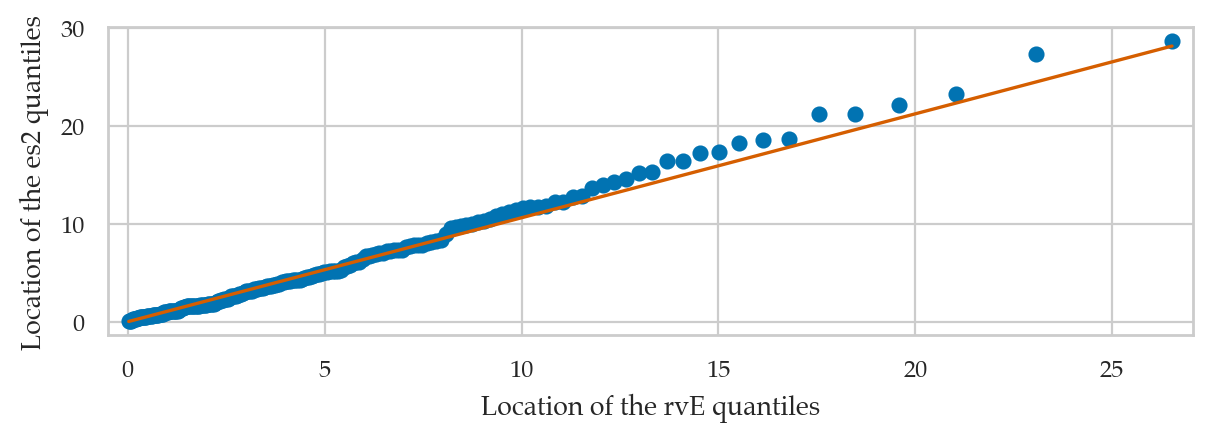
Another way to generate a Q-Q plot is to use
the function qqplot defined in the the statsmodels package.
# ALT. use the helper function `qq_plot` from `ministats`
from ministats import qq_plot
ax = qq_plot(es2, dist=rvE)
ax.set_xlabel("Location of the rvE quantiles")
ax.set_ylabel("Location of the es2 quantiles");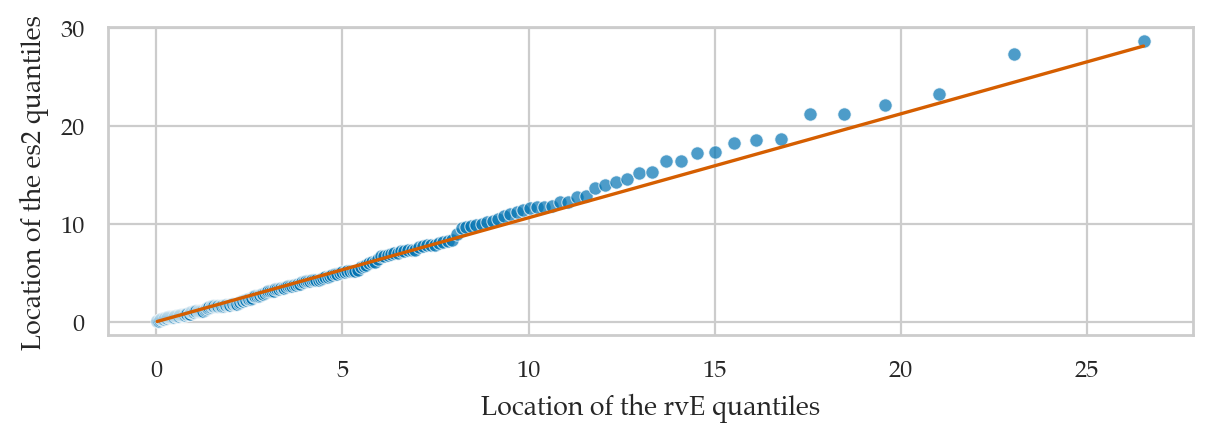
Exponential data vs. standard normal
from scipy.stats import norm
qqplot(np.array(es2), dist=norm(0,1), line="q");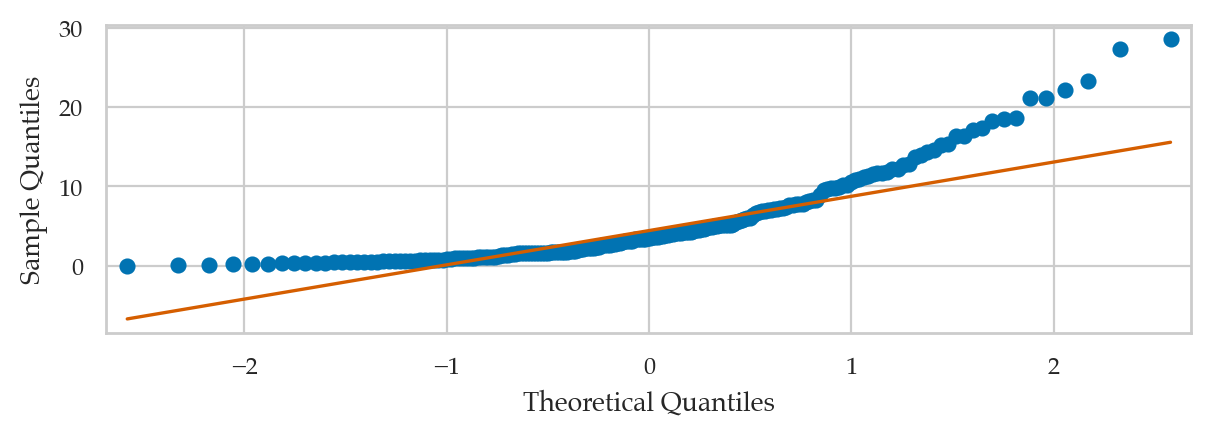
Note the lowest quantiles don’t match (exponential data limited to zero), and the high quantiles don’t match either (exponential data has a long tail).
Normal data vs. standard normal
Here is an example of a Q-Q plot with very good fit.
rvN = norm(100, 5)
ns = rvN.rvs(1000)
qqplot(ns, dist=rvN, line="q");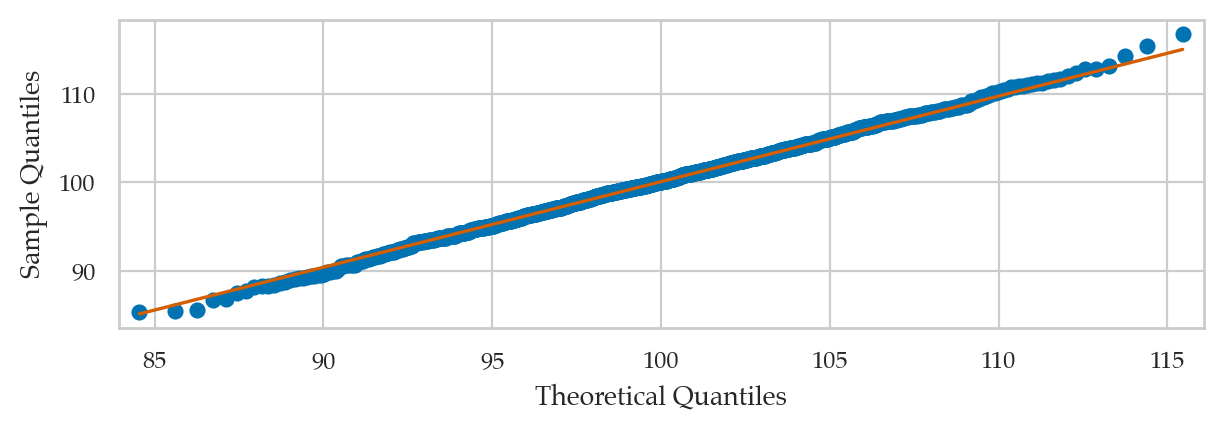
Student’s t-data vs. standard normal
from scipy.stats import t as tdist
np.random.seed(46)
rvT = tdist(df=5)
ts = rvT.rvs(300)
qqplot(ts, dist=norm(0,1), line="q");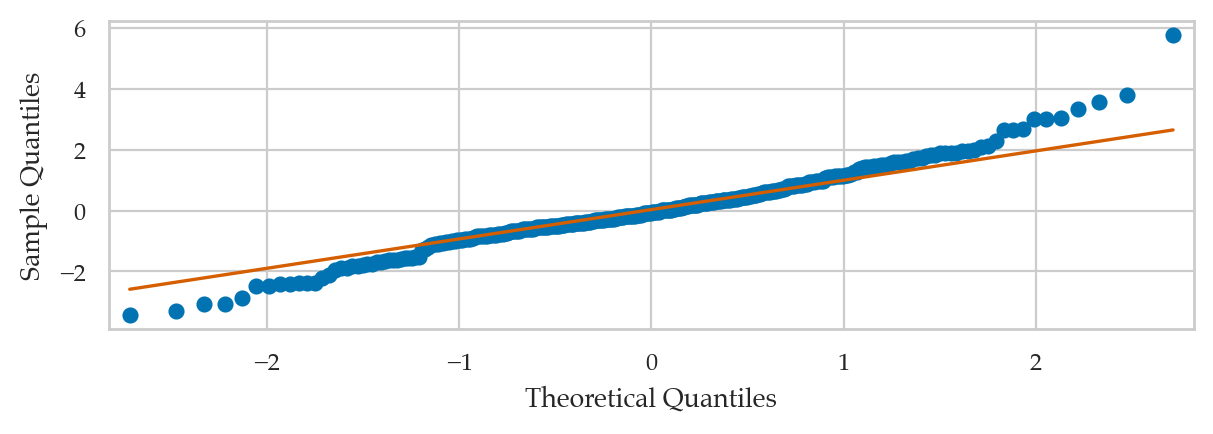
Bimodal data vs. standard normal (BONUS EXAMPLE)
from ministats.probs import MixtureModel

np.random.seed(47)
rvBN = MixtureModel([norm(0,1), norm(4, 1)], weights=[0.5,0.5])
bns = rvBN.rvs(1000)
qq_plot(bns, dist=norm(0,1));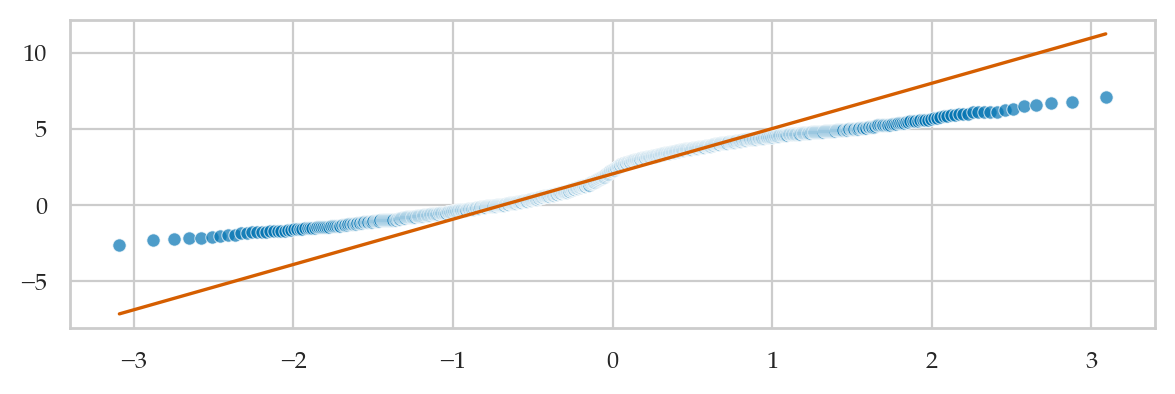
Comparing moments
A simple way to measure how well the data sample fits the probability model is to check if the data distribution and the probability distribution have the same moments.
In order to easily be able to calculate the moments of the data samples,
we’ll convert es into a pandas series object,
which has all the necessary methods.
es2_series = pd.Series(es2)es2_series.mean(), rvE.mean()(5.3330881197327535, 5.0)es2_series.var(), rvE.var()(30.45191637582025, 25.0)es2_series.skew(), rvE.stats("s")(1.711852367068079, 2.0)es2_series.kurt(), rvE.stats("k")(3.0431185936008607, 6.0)Kolmogorov–Smirnov distance
from scipy.stats import ks_1sampLet’s jump right ahead and compute the KS distance for the data and distribution of interest.
ks_1samp(es2, rvE.cdf).statistic0.048609282602185055sns.ecdfplot(es2, label="eCDF(es2)")
bs = np.linspace(-10,35)
sns.lineplot(x=bs, y=rvE.cdf(bs), label="CDF $F_E$");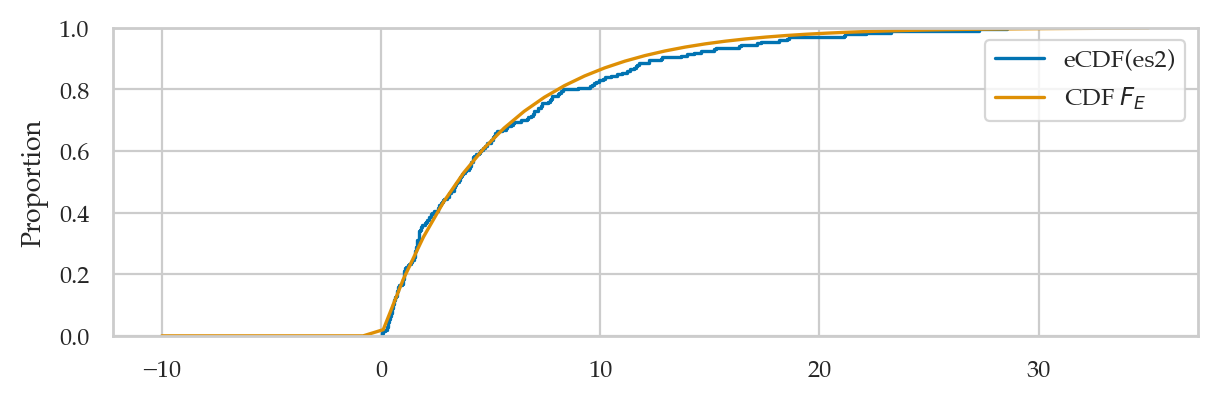
from ministats.book.figures import plot_ks_dist_with_inset

plot_ks_dist_with_inset(es2, rvE, label_sample="eCDF(es2)", label_rv="CDF $F_E$");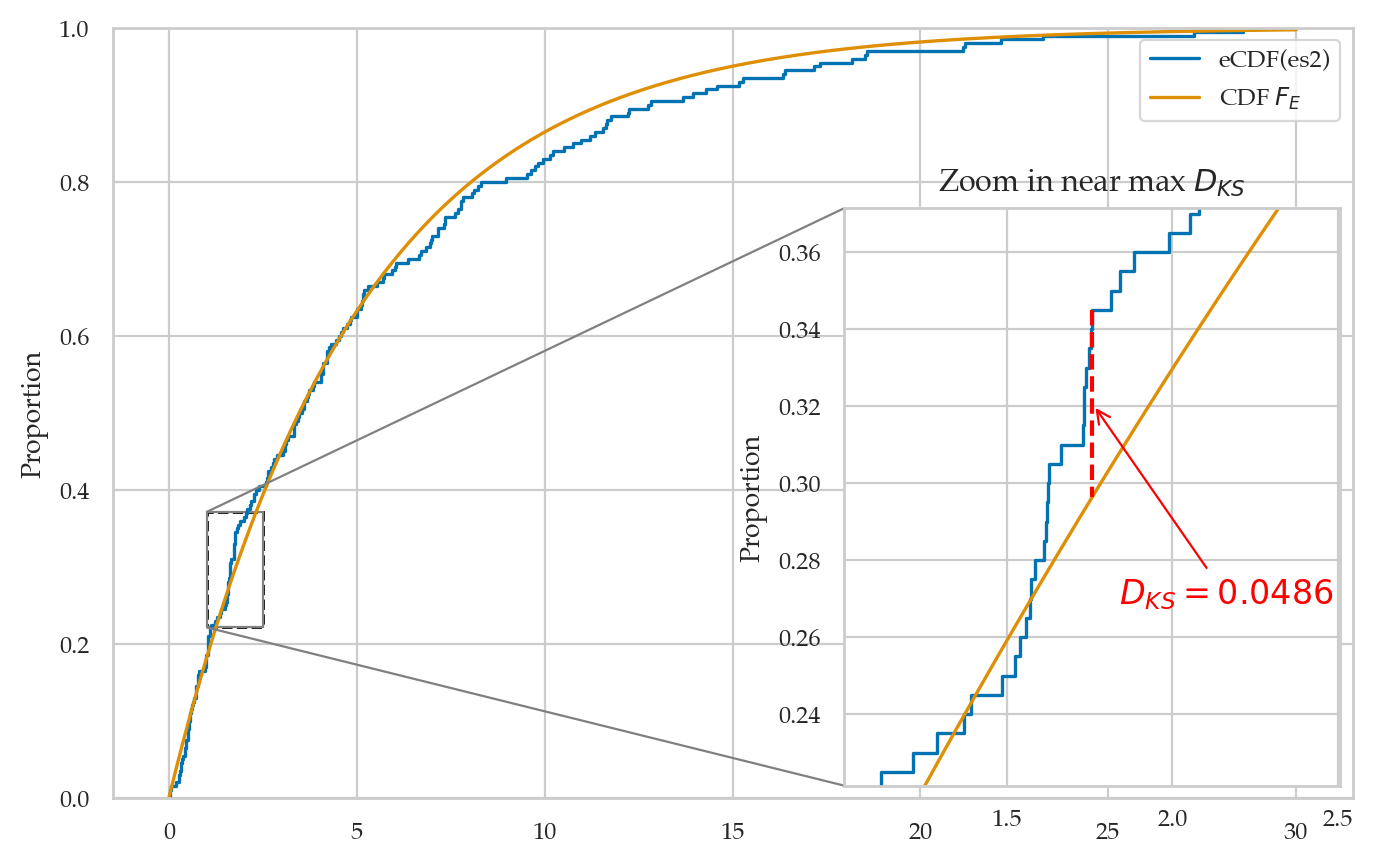
Discussion
Seeding random number generators
Every time you run the following two cells, you’ll get different numbers.
from scipy.stats import norm
rvZ = norm(0,1)
rvZ.rvs(3)
array([-1.29926108, 1.10740701, 1.66512925])rvZ.rvs(3)array([ 0.82613809, -0.93630083, -1.2185572 ])We can set random seed for repeatability.
import numpy as np
np.random.seed(46)
rvZ.rvs(3)
array([0.58487584, 1.23119574, 0.82190026])np.random.seed(46)
rvZ.rvs(3)array([0.58487584, 1.23119574, 0.82190026])